

Script Details
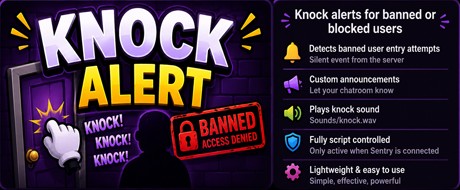
Knock Alert plays a knock sound and displays a custom message whenever a banned member attempts to enter your NatterFly chatroom.
Using NatterFly's Sentry scripting system, the script responds to knock events automatically, allowing you to customise the announcement or simply use it as a notification for moderators.
Features
Detects banned users attempting to enter a chatroom.
Plays a knock sound effect.
Displays a fully customisable announcement.
Lightweight and easy to configure.
Runs automatically while Sentry is connected.
Simple to edit with any plain text editor.
A fun and simple script that lets your chatroom react to banned entry attempts while remaining fully controlled by NatterFly Sentry.
Installation
Copy the script code from this page.
Open Notepad (or any plain text editor).
Paste the script into the new document.
Save the file as Knock Alert.txt inside your Scripts folder.
Open NatterFly Sentry.
Click Scripts from the top menu.
Click Load Script and select Knock Alert.txt.
The script will begin monitoring knock events automatically while Sentry is connected.
Using NatterFly's Sentry scripting system, the script responds to knock events automatically, allowing you to customise the announcement or simply use it as a notification for moderators.
Features
Detects banned users attempting to enter a chatroom.
Plays a knock sound effect.
Displays a fully customisable announcement.
Lightweight and easy to configure.
Runs automatically while Sentry is connected.
Simple to edit with any plain text editor.
A fun and simple script that lets your chatroom react to banned entry attempts while remaining fully controlled by NatterFly Sentry.
Installation
Copy the script code from this page.
Open Notepad (or any plain text editor).
Paste the script into the new document.
Save the file as Knock Alert.txt inside your Scripts folder.
Open NatterFly Sentry.
Click Scripts from the top menu.
Click Load Script and select Knock Alert.txt.
The script will begin monitoring knock events automatically while Sentry is connected.
Full source
View Script
[script]
name = Knock Alert
author = EmmaS
version = 1.0
enabled = on

[rule]
id = knock_message
trigger = knock
type = exact
match = banned
action = say
reply = Knock knock knock... %nick% is banned, so cannot come in!
ignore_self = off
cooldown_ms = 3000