

Script Details
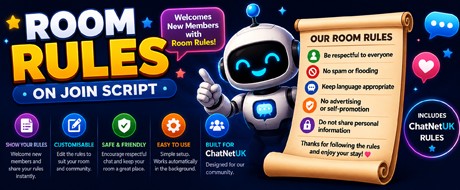
Room Rules automatically displays your chatroom rules whenever a member joins your NatterFly room, helping new members understand your community guidelines from the moment they arrive.
Rather than relying on members to read a room description, the script presents your rules directly in the chat after a configurable delay, making them much more likely to be seen. Every message is fully customisable, allowing you to tailor the rules to suit your own community.
Whether your room is family-friendly, music focused, gaming based or simply has its own unique atmosphere, Room Rules helps reinforce the standards you expect while encouraging a welcoming and respectful environment.
The script is lightweight, easy to configure and works automatically in the background whenever someone joins the room.
Features
Automatically displays your room rules when members join.
Fully customisable rule messages.
Configurable delay before the rules are displayed.
Option to ignore staff members.
Perfect for welcoming new members.
Helps reduce repeated reminders from moderators.
Encourages respectful and friendly conversations.
Suitable for public, private and themed chatrooms.
Simple to edit with any plain text editor.
Runs automatically in the background with no user interaction required.
A great script for chatroom owners who want every new member to receive a friendly welcome while making sure everyone understands the room's expectations from the very beginning.
Installation
Copy the script code from this page.
Open Notepad (or any plain text editor).
Paste the script into the new document.
Save the file as Room Rules.txt inside your Scripts folder.
Open your NatterFly web client.
Click Scripts from the top menu.
Click Load Script and select Room Rules.
Once the script has loaded successfully, it will begin running automatically.
Rather than relying on members to read a room description, the script presents your rules directly in the chat after a configurable delay, making them much more likely to be seen. Every message is fully customisable, allowing you to tailor the rules to suit your own community.
Whether your room is family-friendly, music focused, gaming based or simply has its own unique atmosphere, Room Rules helps reinforce the standards you expect while encouraging a welcoming and respectful environment.
The script is lightweight, easy to configure and works automatically in the background whenever someone joins the room.
Features
Automatically displays your room rules when members join.
Fully customisable rule messages.
Configurable delay before the rules are displayed.
Option to ignore staff members.
Perfect for welcoming new members.
Helps reduce repeated reminders from moderators.
Encourages respectful and friendly conversations.
Suitable for public, private and themed chatrooms.
Simple to edit with any plain text editor.
Runs automatically in the background with no user interaction required.
A great script for chatroom owners who want every new member to receive a friendly welcome while making sure everyone understands the room's expectations from the very beginning.
Installation
Copy the script code from this page.
Open Notepad (or any plain text editor).
Paste the script into the new document.
Save the file as Room Rules.txt inside your Scripts folder.
Open your NatterFly web client.
Click Scripts from the top menu.
Click Load Script and select Room Rules.
Once the script has loaded successfully, it will begin running automatically.
Full source
View Script
[script]
name = Room Rules
author = EmmaS
version = 1.0
enabled = on

[rule]
trigger = join
delay_ms = 3500
action = say
reply = %room% Rules %nick%. Please take a moment to read our room rules.

[rule]
trigger = join
delay_ms = 6500
action = say
reply = Be respectful to everyone. Friendly debates are welcome, personal attacks are not.

[rule]
trigger = join
delay_ms = 9500
action = say
reply = Please avoid flooding, excessive CAPS, advertising and disruptive behaviour.

[rule]
trigger = join
delay_ms = 12500
action = say
reply = Chat safely. Never post personal contact information in the room.